
Time Tracking Week!!
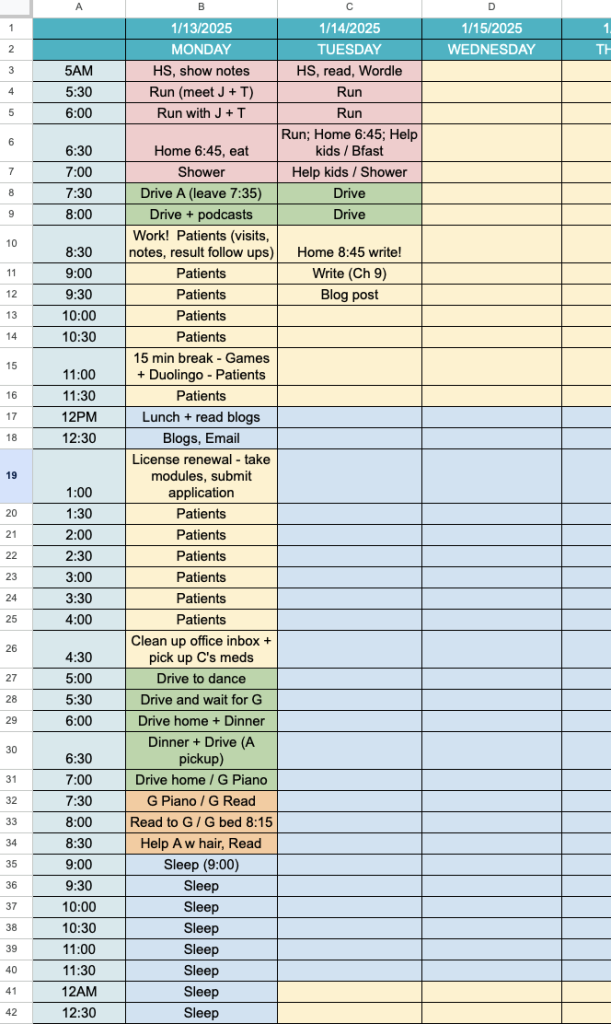
I told Laura I’d try digital this time, and I’m giving it a go with Kae‘s Google Sheet template! It does work pretty nicely. The thing about using paper is that it’s much easier to leave unaccounted-for gaps. Spreadsheets will punish you for that with a glaring empty cell!
I love doing at least one week of time tracking each season, so this will be my week for Q1. We will see if any insights come of it . . . I can already take some guesses, but I’ll save the analysis until it’s over.
2025 Goals, Continued
No, we are not done (lol). The next goal on my list is work on establishing an effective SHUTDOWN RITUAL at the end of the work day.
I generally do not do any “second shift” work on weekdays (instead, when I need to do extra work — usually on my writing/business stuff — I usually do it on the weekends). Yet I often find myself in this weird space of done, but not really admitting to myself that I’m done, and continuing to check email / do last minute little things even though I’m well past the point of having much focus or really desire to do any work.
SO, I want to work on a more formalized shutdown ritual, particularly on my work-from-home (nonclinical) days! This ritual needs to be simple but definitive. Here is my desired process:
- Migrate any undone tasks for the day by putting a horizontal line through them.
- Close all windows on my laptop (just a signal to my brain that I’m done!)
- Dock my phone somewhere so I’m not tempted to check email or for other sources of inputs.
This is pretty simple but I think should do the trick. Cal Newport popularized the idea of some kind of catchphrase at the end of one’s shutdown (I think he says something like “Schedule Shutdown Complete!”) but I think my low-key version is likely enough. I think it’s the migration step that actually key – accepting the “un-doneness” of things in a formal way.
(Note: I know people differently on their philosophies on this, but I am okay having a daily to do list that is on the ambitious side. NOT crazy-over-packed-and-unrealistic, but if I flip through my planner I see that typically I get ~80% of my planned tasks done on any given day, and I’m okay with that ratio!)
Anyone have a quirky or definitive Shutdown ritual they swear by? Anyone else time tracking?

17 Comments
Ooh! I love your idea of putting a horizontal line through any undone tasks. I usually check off AND put a line through completed tasks, leaving the undone ones glaring at me. But to put a line through the undone ones, then write them down on the next day you plan to actually do them could be quite freeing. Thank you for another fabulous tip! This one is definitely book worthy :).
Laura gets original credit for my time tracking spreadsheet!! I got it from her, then just edited it some/ spruced it up a little! 😉 I do think if you’re planning to do it once a quarter, having the digital version could be really great! Then you can easily save them and compare future quarters or even years!
Quirky shut down, I had a colleague at Child Protective Services who wore his id badge as required. But his shut down routine was, before he got in the car, he took off the badge and tucked it in his laptop bag. That was his “off duty” signal.
I am tracking my time this week too. So funny about the unfilled cells — they don’t bother me. I actually don’t fill them all in. Whatever entered in the last cell continues down until there is something else entered. So today in the 7:30 cell it says patients. The cells 8-10:30 are blank (I saw patients the whole time) and 11 says Talk to SE (my business partner), make coffee, read blogs. 11:30 will be back to patients.
Gillian this makes me want to reach through the internet and write “patients” on your 8-10:30 cells. HA!
Hahahah! I am usually very type A but not about this. 😉
I circle my undone tasks and draw an arrow to the right, indicating to myself that I need to migrate it to a future date.
I do better with shutdown on the days I go to work than my work-from-home day. I have to force myself to put my computer away and stop working sometimes. That is my signal to myself though. I just need to be better about watching the time so I do it.
i like the circling undone tasks & drawing an arrow to the right! i think i may steal this idea for my planner :).
I don’t recall where I read this, but I’ve started using a highlighter to “cross off” my done tasks. Seeing my list all colored in orange (this week’s color) is very satisfying!
I’m doing the time tracking thing. I wanted paper so a got a cheap Japanese journal. There’s extra room on the side so I’m also doing my food journaling in the same place, and I’m tracking a few other health things in there too. I’m using the one called time table: https://shop.mochithings.com/products/99567/variants/99568
ooh that’s a fun analog version!!
love this post! very relevant to how i’m trying to figure out my work-life balance right now –
– my shut down ritual – close all tabs & shut down lap top, quickly tidy up in living room/kitchen, turn off all lights, do night time routine [contacts out, oral hygiene + night guard, simple skin care routine, deodorant (haha yes, i put deo on at night)], set alarm for the a.m., glance at my planner one last time [check off tasks, i also put a horizontal line through undone tasks!, & jot down my tasks for the next day if i haven’t already], do a word search or read a few pages, lights off, & then sleep.
– time tracking – i tracked my work time for 3 weeks straight. i told myself that i would not do it any longer starting yesterday, but today i didn’t track my work time, & i was not “on top of it” like i was the past 3 weeks! so i realized that tracking my work time helps me stay on task. i make my own time tracking sheet for work in google sheets – first column – day of the week, second column – date, 3rd column – start time, 4th column – end time, & 5th column – time duration. i let google sheet do the math at the end of the work day to let me know how many hrs i worked that day. this helps me not go over 40 hrs too much with my documentation & misc admin time!
My shut down ritual will probably make type A people’s skin crawl! I just….close my laptop and planner. With all the tabs open. Including my email (which is absolutely not at zero lol). Then I shut off the lights and leave my laptop at work- this is key! If I bring it home, I’ll feel a weird sense of guilt for not using it. When I get to work the next day I look at all the tabs I left open and close the ones I don’t need right away. Ditto for the planner. I look at the stuff I didn’t cross off and highlight or rewrite the things I really need to get done that day.
haha that doesn’t make my skin crawl at all honestly – it sounds very functional, definitive, etc! I don’t think rituals need to be fancy . They just need to be clear and yours sounds like it really is to you (and you do the “clean up undone stuff” the next day and it sounds like that works well in your case!)
On clinical days my shutdown ritual involves giving signout, changing out of my scrubs, and leaving the hospital. I may check to make sure all my documentation is in order before I leave, but I might not because it’s annoying and Epic will alert me at some point about my deficiencies anyway. I use checking Epic as a procrastination mechanism on my non-clinical days lol.
On non-clinical days (a little afraid to put this in writing)… I usually just walk away from my computer, leaving it on with multiple documents and tabs open, at whatever time I’ve decided to stop working. Today it will be 5 probably. Then I work out or go to dog class or whatever we have to do that evening. Sometimes (rarely, briefly — I go to bed at 8:30) I come back and tweak documents later in the evening but it doesn’t really cause me agita. I don’t strive for inbox zero and don’t see the point of it, frankly.
Before bed I floss, brush, take medications, and usually shower. Then I get in bed with the dogs and read and Dyl and Luca say goodnight. I read for 10-20 min then lights out before 9. Last night I did restorative yoga when I got home (it was a late night, and everyone was at dog school), which was lovely, but I don’t have time to do that every night, and I didn’t work out, so. I haven’t had trouble falling asleep in a while but still wake up 3-4 times per night. I don’t think there’s anything to be done about that except go to bed early.
See I actually would be fine with the “close laptop and be done” but somehow I need something else to truly SIGNAL I’m done and to STOP LOOKING FOR THINGS. This looks very functional though!
I don’t struggle with shutdown nearly as much on clinical days, I empty EPIC and then my drive home serves as sort of a wind down. It’s the nonclinical I need to work on!
On an ideal day, I’ll review my daily plan, tick off all that got done, migrate anything undone to the next day, and actually look at the plan for the next day. This is key for me. Knowing what the plan is for tomorrow (or next work day), is helpful to signal to my brain I’m ready to be done. And then I shut down my laptop and close my planner. BUT fairly regularly I’ll work right up until
I have to leave to pick up my son from daycare, and just shut my laptop and rush out the door, with tabs still open etc. That’s definitely less ideal, and doesn’t have that nice done feeling.
Definitely have a shutdown ritual. All windows closed on chrome, desk cleaned up, lamp turned off, classroom cleaned up (example: stray pencil left behind by a student), board erased, projector turned off, pens are in a cup, papers are in their respective folders. Books are in their place. A yellow pad has tasks for next day. Door closed and locked, badge, classroom keys, and parking tag into the glove compartment. No work emails at home.